01
Background sync
Connect local folders to your cloud. Pause jobs, retry transfers and keep track of conflicts.
 NeutronDrive
Your files. Your photos. Your desktop.
The independent open-source client brings your cloud to where you work.
Free & open source · No NeutronDrive subscription
01 / FEWER DETOURS
Cloud convenience. Linux feel.Feature overview reviewed for v0.1.0-beta1
Connect local folders to your cloud. Pause jobs, retry transfers and keep track of conflicts.
Download content on demand. “Keep on device” makes selected files and folders available on your computer.
Timeline, image viewer and albums. Cached thumbnails stay available between sessions.
Native Qt Quick interface, light and dark modes, tray and autostart. File-manager integration depends on your desktop.
02 / INSIDE THE APP
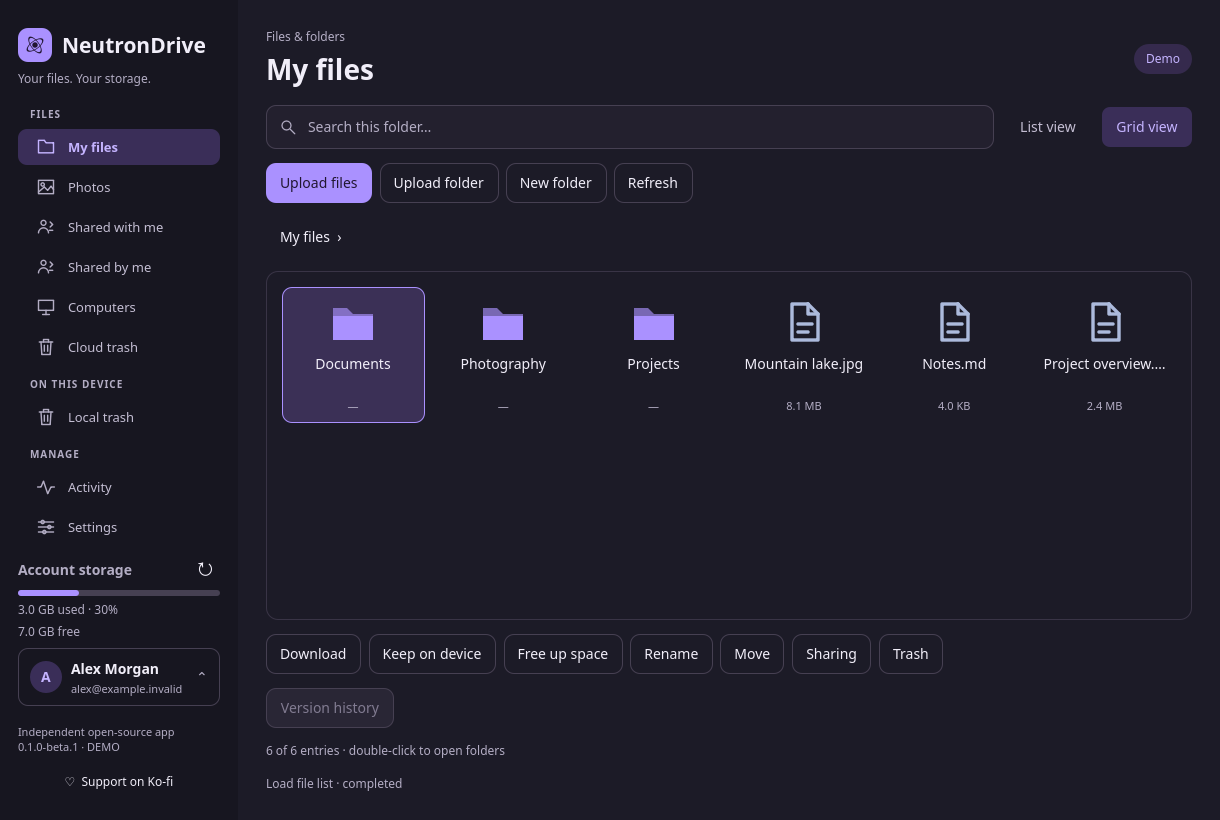
Real interface. No mockups.From your first folder to your latest holiday photos.
This is NeutronDrive in everyday use.
Your cloud files in a familiar interface. Grid or list, with search, upload and download.
Screenshots from v0.1.0-beta1 · Real interface with sample data.
03 / OPEN CODE. CLEAR LIMITS.
NeutronDrive uses Proton’s open-source SDK for account access, encryption and service requests. Sign-in takes place on Proton’s website in your browser.
Read the security approachA community project under the MIT licence. Not affiliated with, endorsed by or officially supported by Proton AG.
Check the current release notes for limitations and package signatures. Keep an independent backup.
Synchronised files and local caches are stored as plaintext on your device. Protect your user account and use disk encryption if needed.
04 / READY FOR YOUR DESKTOP
Choose the package for your distribution.
All downloads come directly from GitHub.
Latest published release, including previews. Check the release notes before installing.
Ubuntu · Debian · Mint
x86_64 & ARM64Loading packages…
Fedora · openSUSE
Separate x86_64 packagesLoading packages…
Portable on Linux
x86_64 · GLIBCLoading packages…
Across distributions
Native helper for online filesLoading packages…
Systems with snapd
Secret Service connection requiredLoading packages…
Arch Linux · Manjaro
Package & recipe · not in the AURLoading packages…
Community builds. Verify downloads with SHA256SUMS; checksums do not replace signatures. Package availability, architectures and system requirements may change between releases. Read the current release notes and the installation guide.
Install the packageDownload the appropriate format from GitHub.
Sign in to ProtonThrough Proton’s website in your browser.
Choose a sync folderStart with an empty folder.
No. NeutronDrive is an independent open-source project and is not supported by Proton AG. You need a Proton account with access to Proton Drive.
Yes. The source code is MIT licensed. There is no NeutronDrive subscription. Proton’s own plans and terms apply to Proton storage and services.
NeutronDrive is built for Linux. File-manager integration and status icons depend on the desktop and its version. GNOME needs a suitable extension for a visible tray icon. Sandboxed packages have additional limitations.
No. Online files are downloaded on demand. Use “Keep on device” to select files or folders for offline use. Wait for downloads to finish before disconnecting.
The current release notes below describe changes, requirements, limitations and upgrade instructions.
Report reproducible bugs through GitHub Issues, review translations or contribute code. Report security vulnerabilities through the private reporting process described in SECURITY.md.